
Blog
23/04/2026
Make Analytics Conversational and Operational: Tableau Next + Semantic Layer + AI with Fluido
10 minute read
Why companies today cannot drive actions with analytics
A key challenge that companies have been facing for years is data centralisation and insights generation. From data silos to undefined business processes, to the lack of data collection and beyond, business is in a constant pursuit of making sense of its performance, external environment, and competitors using data.
Even when businesses can overcome the hurdle of collecting high-quality data, visualising it, and sharing it with their teams, there is still the human element – educating their user base on how to read, understand, and draw insights from data to make informed decisions.
This is where modern, AI-powered solutions could finally hold the answer. Tools like Tableau Next can bridge the gap between end users and data insights by providing a natural language interface, enabling users to converse with the data and ask questions without extensive training or knowledge of the underlying data.
What is Tableau Next?
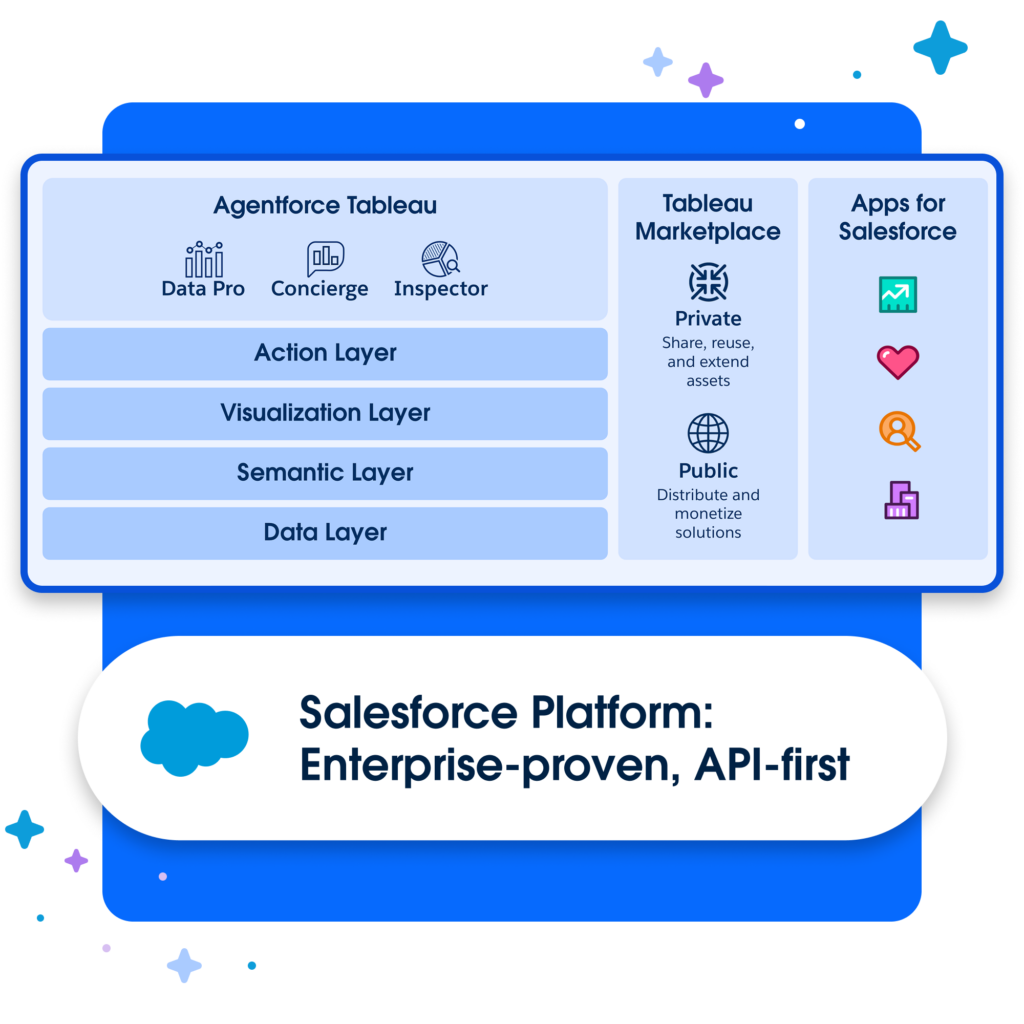
Tableau Next is Salesforce’s latest addition to the Data 360 (Data Cloud) suite inside Salesforce, bringing some of the best-in-class visualisations from Tableau into the Salesforce environment. Using Data 360 as the core data source, Tableau Next can draw data not only from your Salesforce org but also from hundreds of external systems using zero-copy. All of this is further supported by a semantic layer, which brings your internal business language to your data points and finally exposes it to an AI assistant in the form of Agentforce.
Inside Tableau Next, users can ask questions about company data using natural language and, as long as the business has defined the semantic layer in line with the business language, they can get answers to any question they can think of about their business data.
Types of use cases
Like any Analytics solution, the possibilities for use cases are endless. If you have decisions that need to be made based on data, and this data already exists in Salesforce or can be connected to Data 360, then this might just be the solution for you.
A) Sales performance & pipeline action
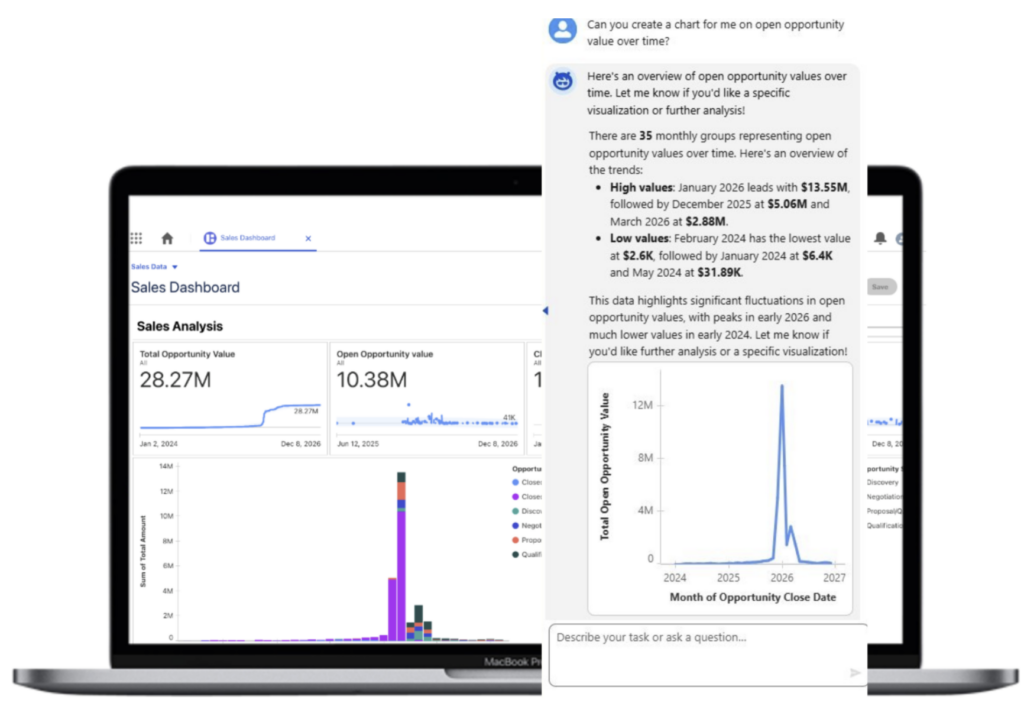
Tableau Next could be a great place for Sales teams to develop Salesforce embedded dashboards that are personalised to their role, from Account Execs and Sales teams to Management and even the C-suite. If their work is currently done inside Salesforce, then there is no better place to show them data visualisations on topics such as ‘Pipeline’, ‘Performance against target’, ‘Next best steps’, ‘Account overviews’ and more.
With the help of Agentforce, they can further ask questions about their current workflow and generate personalised visualisations using natural language.
Read more about the solutions we have built in this space here.
B) Service operations & customer experience
Like Sales, if you currently have a Service team that operates within Salesforce, then Tableau Next is a perfect way to enable them through data. Service managers can monitor team performance through dashboards, dig into insights, and even take action using natural language with AI – for example, upon identifying a spike in a certain topic, they can quickly route cases to another team by asking Agentforce to take this action.
At the same time, each Case can display an embedded dashboard with Account 360 data, providing service teams with more context on the key account and any issues they may have faced.
C) Marketing & growth intelligence
Campaign performance, segmentation, churn prediction, customer lifetime value – all of those are items that typically reside outside of Salesforce, even if your marketing team is using Marketing Cloud. With Tableau Next, we can bring those insights directly into the same experience, while also empowering marketing teams to ask questions about their data using Agentforce and even take action. They could, for example, narrow down a target demographic using natural language and add them into a campaign all from the same chat window with Agentforce!
D) Executive / cross‑functional management
Salesforce and Analytics development can often be siloed – solutions focusing on only one business area, such as Sales, Service or Marketing. These silos often hold businesses back from using cross-functional information (data) to their advantage. Looking at the business from a customer’s perspective, it is very clear: they expect the contact points from Sales, Service, and Marketing to have the same information about them and to speak with the same voice.
This is where Tableau Next’s semantic layer and Agentforce can provide a key bridge between functions, allowing users from different business areas to ask questions whose answers might be based on data from another silo. For example, when preparing for a sales call, a sales exec can ask Agentforce to draw a graph of the timeline and type of cases this customer has raised in order to identify any trends in the issues they might be facing and whether or not now is the time to approach them for an upsell opportunity. In this case, we do not need to educate our salespeople about where the data is, how to access our service dashboards, or what CSAT means; they can simply ask the question and get the answer using Agentforce and Tableau Next’s semantic layer.
Where to get started
If any of the above resonated with you, then you might be thinking about where to get started.
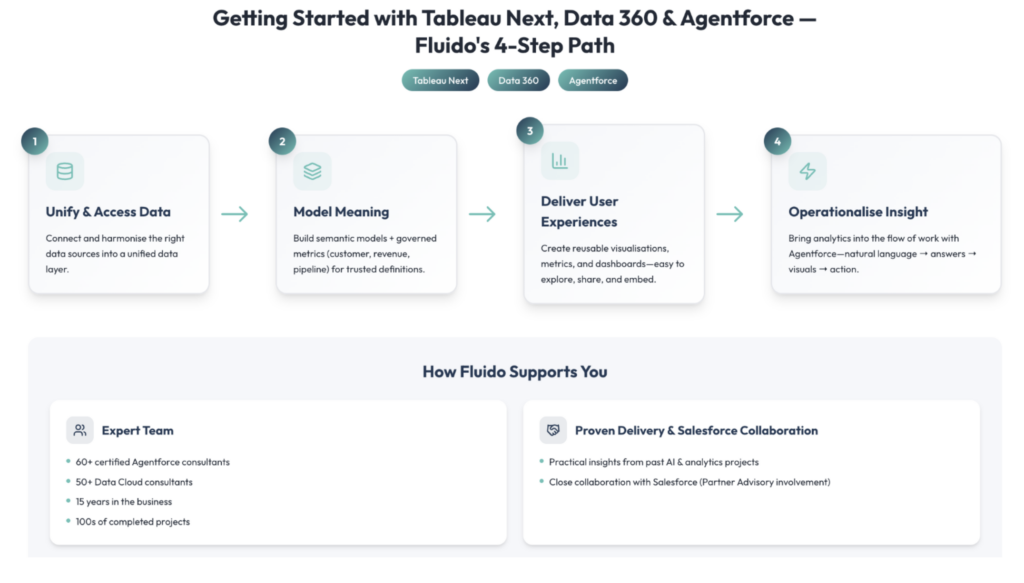
At Fluido, we have a tried-and-tested approach to getting started with Tableau Next, Data 360, and Agentforce.
- First, unify and access the right data by connecting, harmonising, and working from a unified data layer (with Tableau Next data represented as Data 360 objects and organised for delivery via workspaces).
- Second, model meaning by building semantic models and governed metrics that standardise business definitions (for example, what “customer,” “revenue,” or “pipeline” means) so every dashboard and AI interaction is grounded in trusted semantics and consistent interpretation.
- Third, user experiences by creating reusable analytical assets—visualisations, metrics, and dashboards—inside Tableau Next so insights are easy to explore, share, and embed where users already work.
- Finally, operationalise insight by bringing analytics into the flow of work—using Tableau Next’s native integration with Agentforce and workflow/actionability concepts—so teams can move from natural‑language questions to accurate answers, rich visualisations, and action at the moment decisions are made (the “insight → action” outcome your stakeholders actually care about).
Fluido can support you at each stage of this process through the help of our:
- Extensive AI & Analytics team with over 60 certified Agentforce Consultants, over 50 Data Cloud consultants, 15 years in the business and 100s of completed projects.
- Practical insights from our past projects and close collaboration with Salesforce through the Partner Advisory board.
TL;DR (3 bullets):
- Tableau Next combines trusted semantics with AI to deliver contextual, actionable insights.
- Use cases span sales, service, marketing, and exec analytics — especially where insight must drive action.
- Fluido brings proven analytics delivery + Agentforce capability to implement it end‑to‑end.
Are you curious to learn more or ready to take the next step? Do not hesitate to reach out to the author of this post below.

Boris Naumov
Data & Analytics CoE Team Lead, Salesforce Agentforce Advisory board EMEA
Fluido
boris.naumov@fluidogroup.com
Read next
08/04/2026
Certinia PS Cloud Winter ’26: Smarter Time Management for Stronger Financial Control
5 minute read
